
1. Finds the Order
They enter their e-mail and order number - the system checks it via the store API and enforces the submission time window
Instead of "I want to return my order" e-mails - a form that finds the order, verifies the customer and creates a request in your panel. The customer knows what's next, and you have everything in one queue.
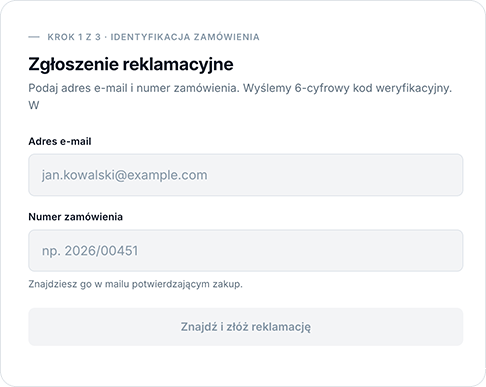
The customer completes the submission on their own, without involving support - on your site, in your colors.
They enter their e-mail and order number - the system checks it via the store API and enforces the submission time window
A verification code sent by e-mail protects order data from third parties
They select order items, describe each one and submit. Confirmation arrives instantly, also by e-mail
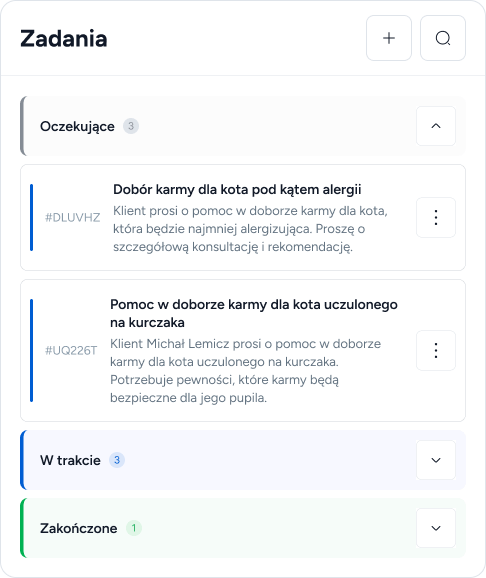
A form submission goes to the task system - with order items and the issue description. Support works from one queue instead of digging through a mailbox.
Assign the task to a consultant, set priority and deadline - like any other inquiry
If you enable status preview, the customer checks the stage of their case themselves - without writing more e-mails
When a submission already exists for an order, the customer sees a notice instead of creating a second one
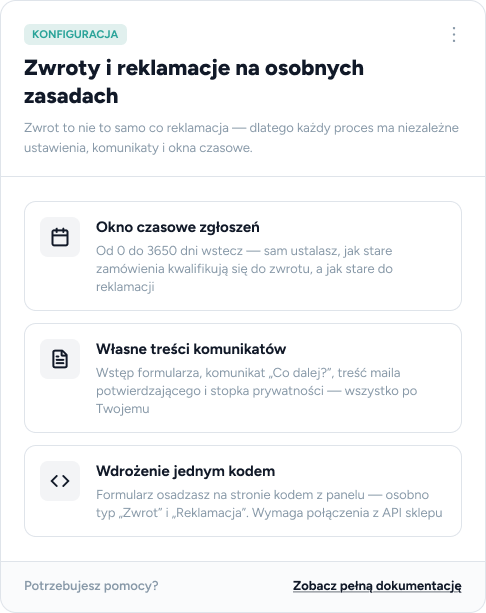
A return is not the same as a complaint - that's why each process has independent settings, messages and time windows.
From 0 to 3650 days back - you decide how old orders qualify for a return, and how old for a complaint
Form intro, the "What's next?" message, confirmation e-mail text and the privacy footer - all your way
Embed the form with a code from the panel - separately for the "Return" and "Complaint" types. Requires a store API connection
A connection between LivBerry and your store's API (WooCommerce, PrestaShop or a custom integration) plus pasting the form snippet on your site. You configure the rest in the panel.
Yes - they are two independent forms with separate time windows, texts and confirmations. You set the consumer 14-day withdrawal period and a longer complaint period separately.
A task with products and the issue description is created in the panel, and the customer receives a confirmation e-mail with the "What's next?" information. The team handles it like any other task.
Yes, if you enable the status preview option - the customer tracks the progress themselves, which reduces follow-up e-mails.