
Tasks Born from Conversations
Link a task to a chat or Inbox thread with one click, and returns and complaints forms create them automatically
Tasks collect everything that needs the team's reaction - from chat, from Inbox and from returns forms. One queue with statuses, priorities and deadlines instead of sticky notes and forgotten e-mails.
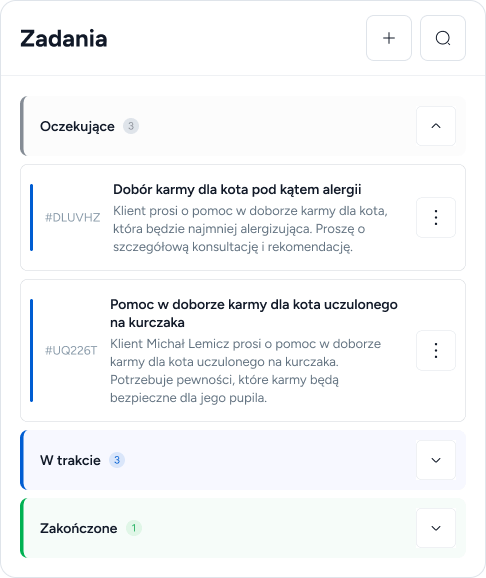
You can create a task manually, but most often it is born on its own - from a chat conversation, an e-mail thread or a return or complaint submission.
Link a task to a chat or Inbox thread with one click, and returns and complaints forms create them automatically
Waiting, In Progress, Done - collapsible groups with counters in a kanban layout
Four priority levels shown as colored flags; tasks past their deadline land on the dashboard as overdue
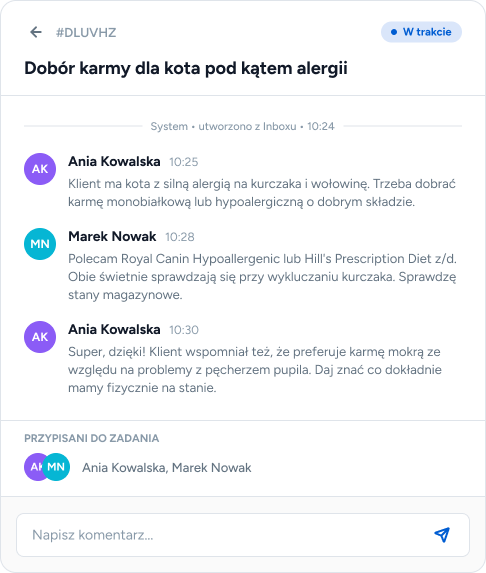
Instead of arrangements scattered across messengers - comments, assignments and the conversation context directly in the task.
You assign consultants to a task, and everyone assigned gets a notification
An internal team chat on every task - comments appear live for everyone
A preview of the conversation the task came from, with a quick jump to chat or Inbox
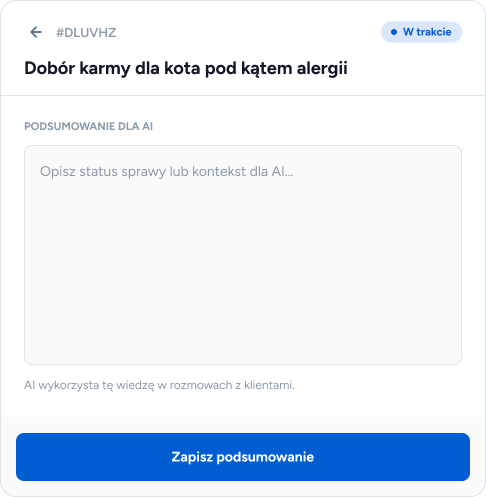
The "Summary for AI" field describes the task context in language the assistant understands - so AI can inform customers about their case status without involving the team.
You describe the outcome or context of the case, and AI uses that knowledge in customer conversations
The customer asks about their case in chat, and AI answers based on the information in the task
Name, e-mail and phone of a customer from outside the system saved directly in the task
From three sources: you create them manually, a consultant creates them from a chat conversation or an Inbox thread, and the returns and complaints forms create them automatically with every customer submission.
No - it is a classic task list with statuses, priorities and assignments. The "Summary for AI" field is optional and becomes useful only when you want to automate case status replies.
Yes - tasks past their deadline are marked as overdue and appear in a dedicated dashboard tile, so nothing slips through.
Yes, every task has an Activity tab - an internal chat visible only to the team, working in real time. If the task was born from a conversation, the Thread tab leads to the original conversation.